Tutorial: Scraping User Videos with Fast TikTok API
The Fast TikTok API’s USER scraping type allows you to gather data about a specific TikTok user’s profile and videos.
This is invaluable for competitor analysis, influencer identification, and understanding individual content strategies.
This guide will focus on using the API’s input UI for the USER type. More details
about The Fast TikTok API.
Why Scrape User Data?
Scraping user data provides several benefits:
- Competitor Analysis: Track the content, engagement, and growth of your competitors.
- Influencer Identification: Find relevant influencers in your niche.
- Content Strategy Insights: Understand what types of videos perform well for specific users.
- Audience Research: Indirectly gain insights into a user’s audience by analyzing their content.
Key Input Fields for USER
When you select USER in the “Choose Scrapping Type” (type) field, the following input fields are used:
-
type(Choose Scrapping Type): Set this toUSER. -
url(Start URL to scrape): This is where you provide the URL of the TikTok user’s profile page. The format ishttps://www.tiktok.com/@username. For example, for the user@tiktok, the URL would behttps://www.tiktok.com/@tiktok. Accuracy is crucial here. You can find this URL by visiting the user’s profile on the TikTok website and copying it from your browser. -
limit(limit): Located under the “Number of videos per search” section (expand it by clicking the>). This is a soft limit, meaning the API will retrieve at least this many videos from the user’s profile. -
isUnlimited(Is Unlimited): Also under “Number of videos per search.” Setting this totruewill attempt to retrieve all videos from the user’s profile. Exercise caution: Users with a large number of videos will take a long time to scrape, and you may encounter rate limits.
Input UI Visualization:
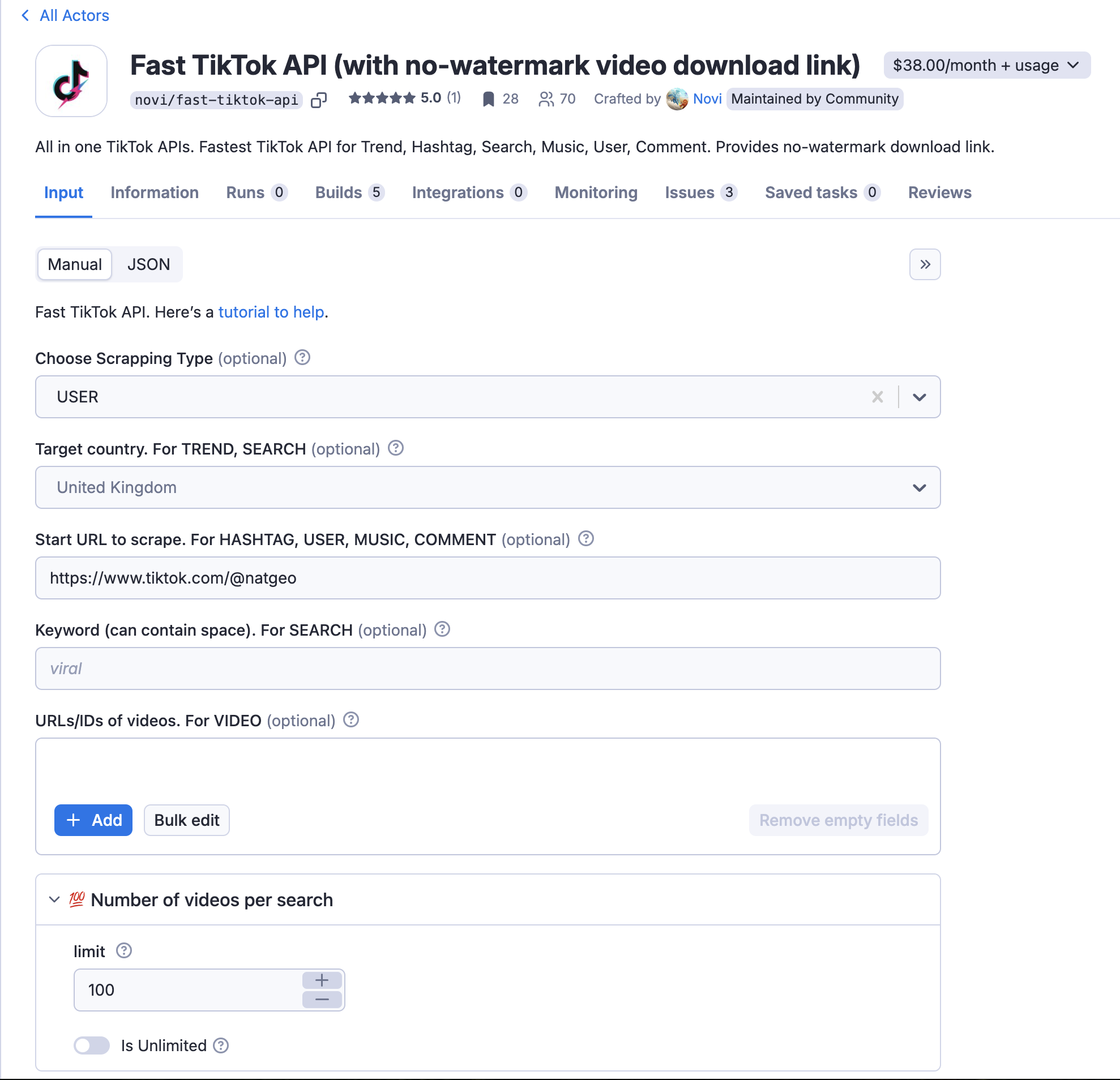
Note that region, keyword, sortType, publishTime, and urls are not used with the USER type.
Example Scenarios
Example 1: Get the first 50 videos from the user @natgeo.
- Find the user’s profile URL: Go to TikTok and find Charli D’Amelio’s profile. The URL
is
https://www.tiktok.com/@natgeo. - Configure the input:
type:USERurl:https://www.tiktok.com/@natgeolimit:50isUnlimited:false
Example 2: Try to get all videos from a user with a very large number of uploads (use with caution!).
type:USERurl:https://www.tiktok.com/@someuser(replace with the actual URL)limit:100(Start with a limit, even if you intend to useisUnlimited)isUnlimited:true(Only after testing with a limit)
Example 3: Get at least 20 videos from a new user @MyNewAccount.
type:USERurl:https://www.tiktok.com/@MyNewAccountlimit:20isUnlimited:false
Tips and Considerations
- Verify the Profile URL: Double-check the URL to ensure it’s correct. A typo will result in errors.
isUnlimitedRisks: Be extremely cautious withisUnlimited, especially for users with a large number of videos. Always start with alimitto test.- User Privacy: Be mindful of user privacy and ethical considerations when scraping user data. Only collect publicly available information and use it responsibly.
- Rate Limits: TikTok has rate limits to prevent abuse. If you’re making a large number of requests, you may need to implement delays or use multiple API keys.
Conclusion
The Fast TikTok API’s USER input is a direct way to collect public data about a specific TikTok creator’s content. By
providing the correct profile URL and managing the limit and isUnlimited options, you can efficiently build datasets
for competitor analysis, influencer research, and content strategy planning.
Related Guides in This Series
This guide is part of a comprehensive series covering every scraping type in the Fast TikTok API. Explore the others:
- 📖 Complete Guide to All Scraping Types — The full index
- 🔍 SEARCH Input Guide — Search videos by keyword
- 📈 TREND Input Guide — Discover trending videos by region
- #️⃣ HASHTAG Input Guide — Scrape videos by hashtag
- 🎵 MUSIC Input Guide — Find videos by sound
- 🎬 VIDEO Input Guide — Scrape specific videos by URL
- 💬 COMMENT Input Guide — Analyze video comments
Looking for data extraction tools?
Check out our comprehensive collection of no-code scrapers and APIs for TikTok, X.com, and more.